




















Table of Contents
- • OnlyOffice Review Summary
- • About OnlyOffice
- • Other opinions about OnlyOffice
- • Overview of OnlyOffice
- • OnlyOffice Review
- • OnlyOffice Business Plan Review
- • OnlyOffice Pros & Cons
- • Usage and Features
- • Subscription and Access
- • OnlyOffice Return Policy
- • OnlyOffice Digital Delivery
- • Contact ONLYOFFICE
- • Where to buy OnlyOffice?
- • Conclusion of OnlyOffice reviews & ratings
OnlyOffice Review Summary
OnlyOffice is an office productivity suite that provides document editing and collaboration tools within the software category, generally serving users who require Microsoft Office-compatible solutions. It tends to offer a balance between offline desktop editors and cloud services, delivering solid collaboration features but may exhibit slower performance with large files and some limitations on advanced spreadsheet functions.
Highlights
- Suitable for individuals and enterprises needing MS Office compatibility and teamwork tools
- Offers desktop, cloud-based editors, and AI integrations
- Balances strengths in format support with performance lags and limited mobile editing
- Overall score: 4.3/5 reflecting practical usability and some constraints
Within the wider landscape of office suites, OnlyOffice stands as a mid-tier option alongside alternatives like LibreOffice and Microsoft 365. For readers seeking a detailed assessment, the OnlyOffice review provides further insights without emphasizing sales or marketing perspectives.
About OnlyOffice
Organizations and individuals often need office software that supports smooth document editing and team collaboration across devices. Compatibility with common file formats and flexible access through offline and cloud are essential to productivity. Security and real-time collaboration also remain priorities in many workflows.

OnlyOffice is a software suite designed to address these needs by offering document, spreadsheet, presentation, and PDF editing tools. It provides both free desktop applications for offline use and cloud-based collaboration platforms. Positioned within the office productivity software market, OnlyOffice balances compatibility, collaboration features, and AI integration.
OnlyOffice is trusted by over 15 million users worldwide and has received industry recognition including multiple leadership awards. Its platform supports real-time co-authoring with built-in chat, video calls, and AI-powered assistants. These authority signals reflect its growing presence among small businesses, enterprises, and public organizations seeking MS Office file compatibility and teamwork facilitation.
The software suits users who need seamless collaboration and flexible deployment options, from personal desktop use to enterprise cloud solutions. However, it may show slower performance with large files and limits mobile editing features to paid plans. For a detailed evaluation, see the OnlyOffice review to help determine if it fits your office productivity requirements.
Overview of OnlyOffice
OnlyOffice is a software company offering an office productivity suite that includes document, spreadsheet, presentation, and PDF editing tools with collaborative features. Originating as a part of Ascensio System SIA, OnlyOffice serves users who require compatibility with Microsoft Office formats and integrated teamwork solutions.
The company operates through a multi-tiered model providing free desktop editors for personal use and cloud-based or on-premises enterprise licenses. Its service offerings include cloud collaboration platforms such as DocSpace, desktop software, mobile applications, and AI-powered assistants for text summarization and translation. OnlyOffice has a global presence, catering to small businesses, enterprises, and public institutions.
OnlyOffice is licensed under GNU AGPL and complies with international security standards. Its platform supports over 15 million users worldwide and has received several industry recognitions including Slashdot Leader Fall 2025 and SourceForge Leader Winter 2026. Key milestones feature the OnlyOffice Docs 9.4 and DocSpace 3.6 releases incorporating AI agents. The OnlyOffice Review highlights its MS Office compatibility and collaborative functionalities while noting performance limitations on large files.
OnlyOffice Review
OnlyOffice is a software brand known for its comprehensive office productivity suite with a strong focus on Microsoft Office compatibility and collaborative work. It offers tools for editing documents, spreadsheets, presentations, PDFs, and fillable forms across multiple platforms. The brand integrates AI features and secure cloud-based collaboration to support diverse user needs. OnlyOffice targets individuals and organizations seeking a unified office solution with both offline and online capabilities.
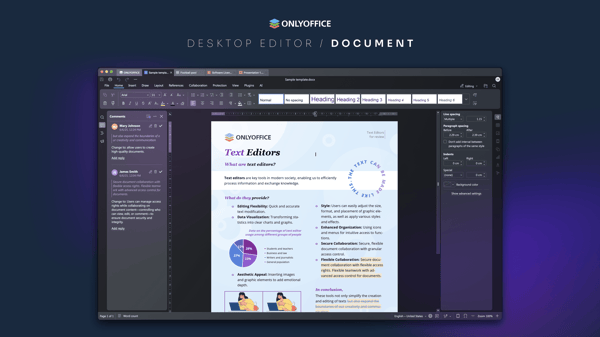
OnlyOffice's product ecosystem includes cloud-based collaboration through DocSpace, desktop editors for offline use, and mobile applications. Its services emphasize real-time teamwork, secure document management, and AI-powered assistance for text summarization and translation. Positioned as a mid-tier alternative to established office suites, OnlyOffice balances compatibility with modern collaboration and security standards. The platform supports a global user base with scalable licensing options for personal, startup, and enterprise use.
OnlyOffice Highlights- Microsoft Office format compatibility
- Cloud and desktop editors
- Real-time collaboration workspace
- AI-powered text tools
- Cross-platform availability
OnlyOffice Business Plan Review
OnlyOffice Business Plan is a cloud-based solution designed for document collaboration across teams. It falls under the category of business productivity software, offering tools to manage and edit office documents collectively. This plan includes features supporting unlimited users, guests, and collaboration rooms, making it suitable for team environments.

The service provides 250 GB of storage per admin along with branding and customization options to tailor the user experience. Additional functionalities include single sign-on (SSO), bi-monthly backups, data recovery, monitoring of logins and actions, and integration with third-party applications. Professional support is part of the package to assist users in managing the platform efficiently.
Pricing is set at $20 per admin per month, with the option to start with a free account and to pay per admin. The plan allows scalability with no user limits and includes features that cater to business needs. Subscriptions are available through the official OnlyOffice website, providing direct access to the platform and support services.
Price $20 • onlyoffice.com
OnlyOffice Pros & Cons
OnlyOffice offers strong compatibility with Microsoft Office formats and an intuitive ribbon-style interface, making it accessible for users familiar with traditional office software. Its real-time collaboration features and advanced PDF editing tools support efficient teamwork and document management. Additionally, the integration of AI-powered assistants adds value by facilitating text summarization and translation, while free desktop editors provide a no-cost option for personal use.
Users should be aware of some performance limitations, such as slower startup and editing times on large files, and the lack of advanced Excel VBA macro support for power users. Mobile editing capabilities also require a paid subscription for full access, and there are occasional reports of software bloat in server versions. Concerns about the origins of the open-source license may also be relevant for some organizations.
- • Excellent MS Office Compatibility
- • Familiar Ribbon-Style User Interface
- • Robust Real-Time Collaboration Features
- • Advanced PDF Editing and Fillable Forms
- • AI Integration for Text Summarization and Translation
- • Free Desktop Editors for Personal Use
- • Scalable Cloud and Enterprise Deployment Options
- • Slower Startup and Editing on Large Files
- • Lack of Advanced Excel VBA Macro Support
- • Full Mobile Editing Requires Paid Subscription
Usage and Features
ONLYOFFICE offers tools for creating, editing, and collaborating on documents both online and offline. It supports various file types, including documents, spreadsheets, presentations, and PDFs. The platform includes AI assistants that assist with text summarization, translation, and document analysis to support productivity for individuals and teams.
Key features include real-time co-authoring and communication, fillable PDF forms with annotation tools, cross-platform desktop and mobile applications, and options for both cloud-hosted and on-premises deployment. This combination of offline and cloud capabilities allows ONLYOFFICE to accommodate different user needs while maintaining a balance between performance and collaboration.
Subscription and Access
ONLYOFFICE provides free desktop editors for personal offline use, allowing users to edit documents without a subscription. Cloud collaboration through DocSpace and enterprise licenses require paid plans. Subscription levels vary according to the number of users and feature access, while full editing features on mobile devices depend on active licenses, limiting free use.
Access is available via direct downloads from the official website, cloud accounts with user dashboards, and on-premises licenses for enterprise deployment. Users gain immediate access after subscription or download. This approach accommodates individuals as well as large organizations needing scalable office suite solutions.
OnlyOffice Return Policy
Details regarding the duration for returns are not explicitly stated, and any associated fees are not specified. There is no publicly available information outlining the conditions under which returns or refunds are accepted. Customers should be aware that these specifics are not clearly documented in the available data.
No information is provided about any exclusions or restrictions related to returns. The lack of transparent return policy details means potential buyers should consider this when making a purchase decision. It is advisable to contact support directly for any clarifications regarding return eligibility or procedures.
OnlyOffice Digital Delivery
ONLYOFFICE is delivered exclusively through digital means, making it available globally. Users can access the software via cloud platforms and downloadable applications for desktop and mobile devices. There is no physical shipping involved in the delivery process.
Access to the services is granted immediately upon download or subscription activation. Feature availability may vary depending on the user’s region and license type, particularly for mobile platform functionalities. No tracking, shipping fees, or physical delivery times are applicable due to the digital nature of the product.
Contact ONLYOFFICE
Users can reach ONLYOFFICE for support or inquiries through several contact methods including email and online forms. Assistance covers orders, technical support, billing, product information, and enterprise deployment.
- Email: [email protected]
- Phone: +37163399867
- Support Page: https://helpcenter.onlyoffice.com/
Contacting the support team by email or web form is recommended as live chat is not offered. Response times for email inquiries are typically within 48 business hours.
Where to buy OnlyOffice?
Users seeking to acquire OnlyOffice can do so exclusively through the official website, with onlyoffice.com providing a structured platform that includes account management systems, accessible customer support, and transparent purchasing policies. While this direct channel ensures reliable transactions and support, potential buyers should note that offline availability is not mentioned and third-party marketplaces may have varying reliability or differing policy terms. The official site offers immediate digital access to desktop and cloud products, allowing for a consistent purchasing experience, albeit with some limitations in mobile editing features requiring paid plans.
Conclusion of OnlyOffice reviews & ratings
OnlyOffice holds a notable place in the office productivity category by offering strong compatibility with Microsoft Office formats and integrating AI-powered collaboration tools. Users can access cloud and desktop versions seamlessly, which makes onlyoffice.com a useful resource for exploring these versatile options. Its balance of offline and online functionalities appeals to individuals as well as organizations seeking dependable document editing and teamwork capabilities.
Exploring the features and performance aspects can help determine if this suite aligns with your needs. Readers looking for a clear understanding can revisit the OnlyOffice review to assess its suitability without pressure. This approach allows for a thoughtful evaluation based on practical use and preferences.
Editorial notes reflect aggregated buyer feedback and our independent editorial review of publicly available information. They are for informational purposes only and do not constitute endorsements. Purchases are made at your own discretion, and we are not responsible for transactions or outcomes related to this store. Experiences may vary. This content is assisted by AI and reviewed by our editorial team. While we strive for accuracy, AI-supported information may not always be 100% precise, so please verify any critical details.

